
Run your repair shop from one screen.
Check in phones, PCs, consoles and TVs, quote from your price list, text customers when it's ready, sell cases and cables, and count the drawer at the end of the shift. Built by a small repair shop, for small repair shops.
Not ready? There's a free plan for one person, up to 30 repairs a month.
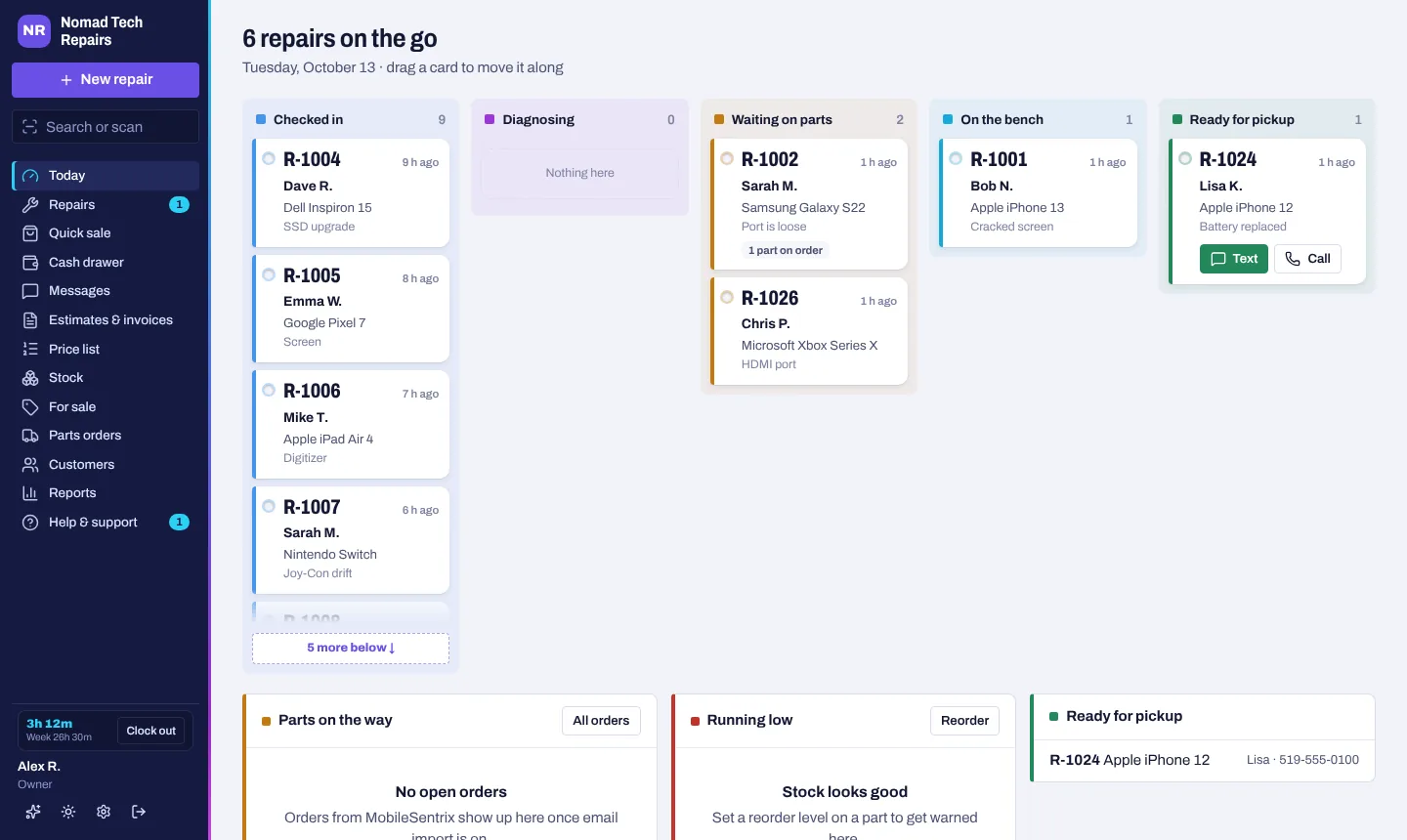
Everything at the counter and the bench.
No add-ons to buy, and a step-by-step user guide inside the app for when you get stuck.
Every repair, start to pickup
Each job is a tag on a board you drag along as you work. The customer gets a text when it's checked in and when it's ready, and can follow along on a tracker link.
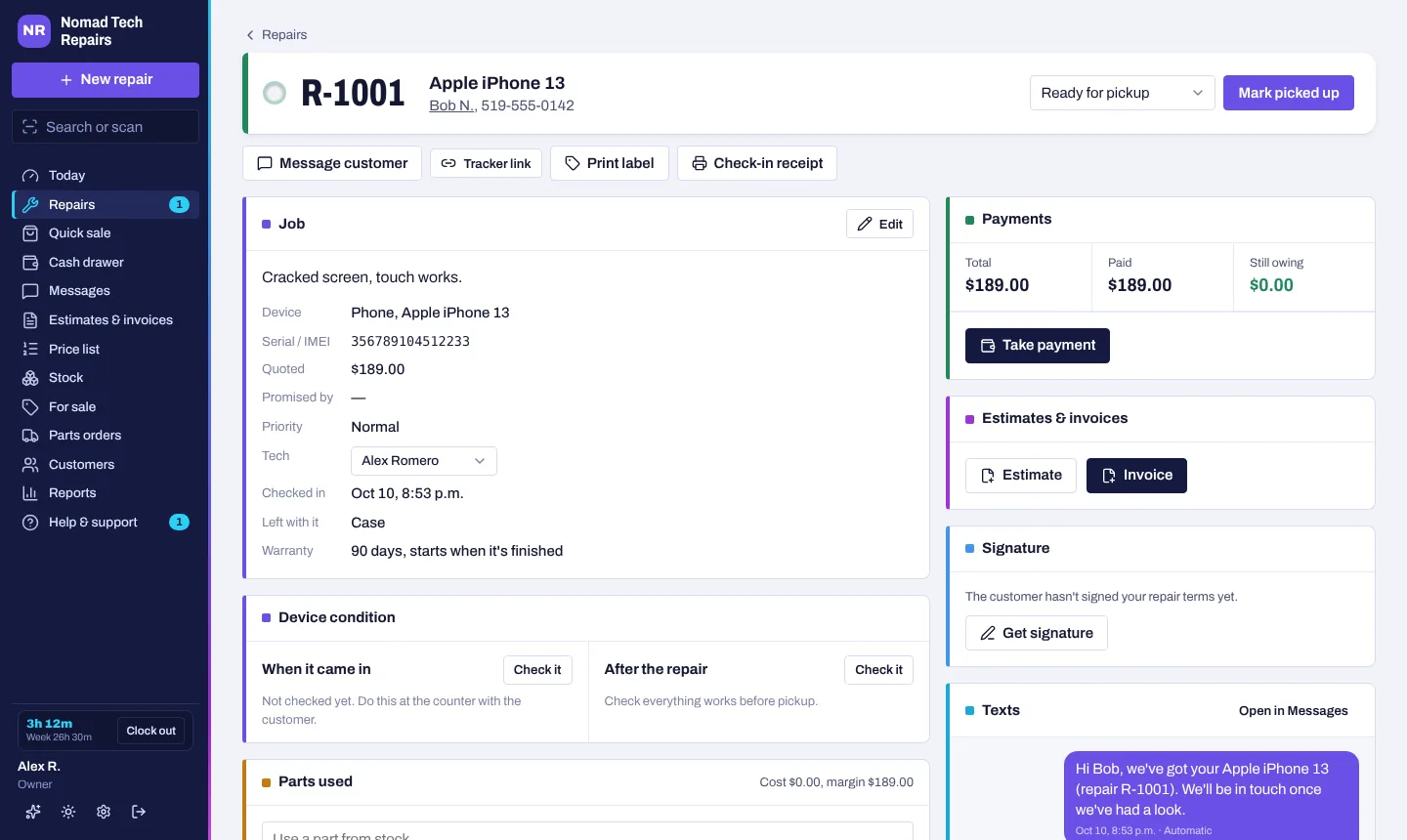
- Check-in with a condition checklist, photos and a signature
- Several devices for one customer? Check them in together with one signature
- Barcode labels for the device; scan to open the repair
- Pickup receipts with the warranty, on letter paper or an 80 mm receipt printer
- Pickup reminders, a final notice and storage fees for devices left too long
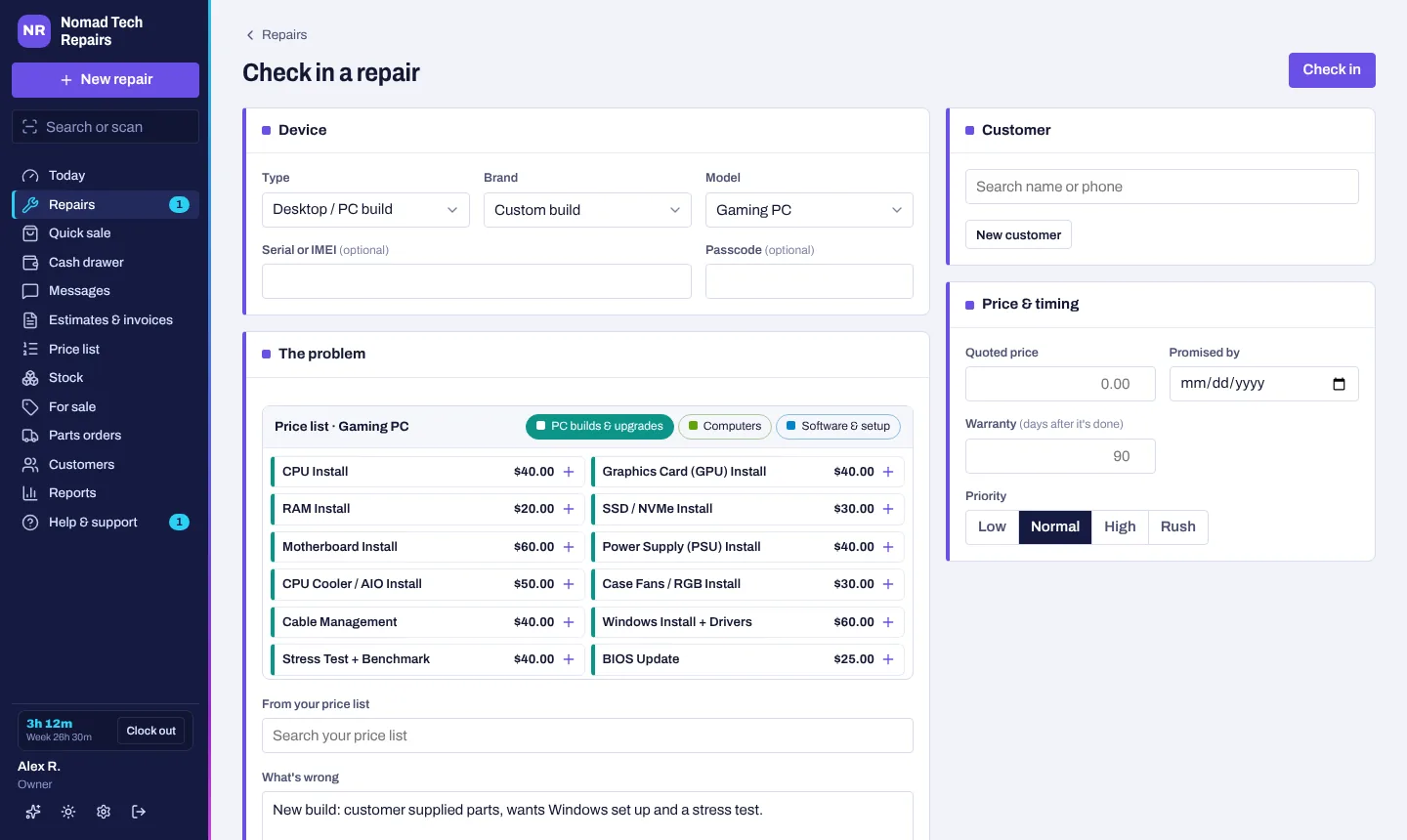
Not just phones
Pick the device and its own price list, common problems and check-in questions come up. A custom PC build is just tapping the parts you install.
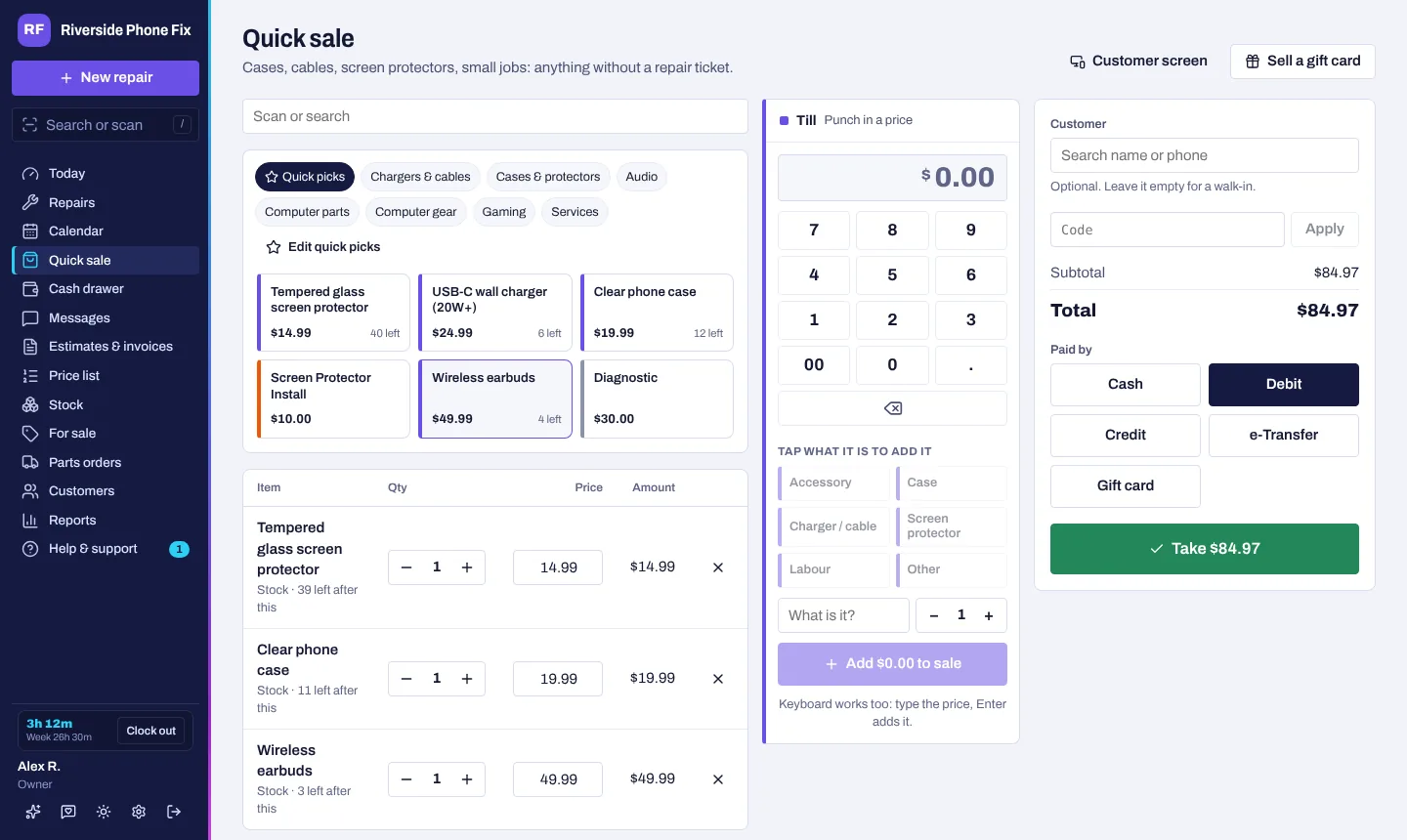
Sell at the counter in a few taps
Pin your best sellers as buttons, or scan the barcode on the shelf label. Stock comes off the shelf by itself, and the sale is saved as a paid invoice.
- Quick picks for cases, protectors, chargers and cables
- Print shelf labels with the price and a barcode
- Gift cards, discount codes and part-plus-labour bundles
- Card on their phone: the customer scans a QR code and pays
- A customer-facing screen, and it keeps working if the internet drops
A drawer that adds up
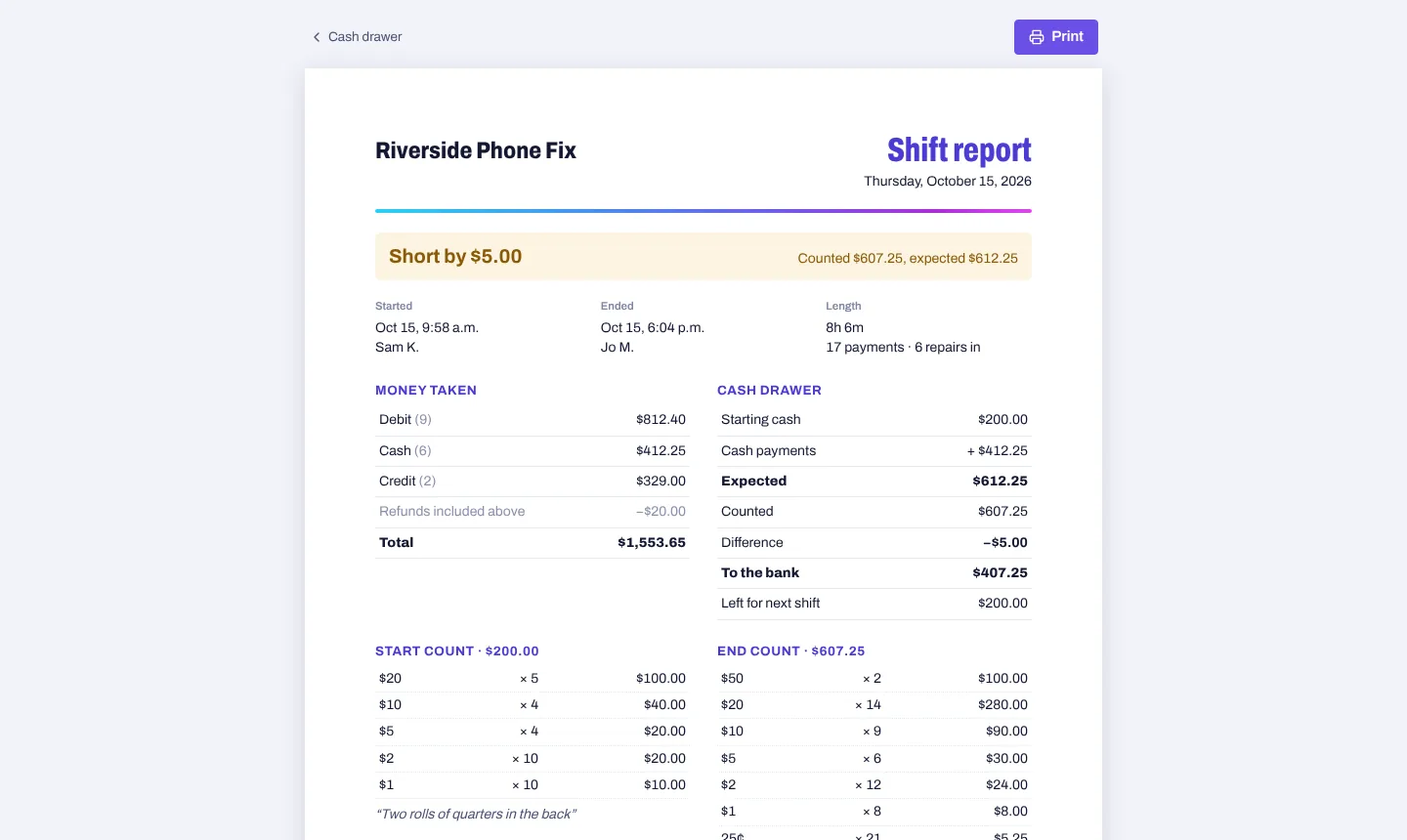
Count the drawer and sign for it to start the shift, note any cash taken out for supplies, and count again at close. You get a one-page report of everything that came in, and whether the drawer is over or short.
- Bills and coins counter, with whole rolls in one tap
- Staff count blind; owners see how it lines up
- Today's money at a glance, no shift needed
- Time clock with punch-in codes for staff
Estimates and invoices
Your tax on everything (HST, VAT, GST or sales tax), deposits and split payments, e-Transfer details for Canadian shops. Customers approve quotes from their phone.
Texting from your number
Canadian shops get a local number with 500 texts a month on Pro, 3,000 on Pro Plus. Anywhere else, connect your own Twilio number. Customers can text you back, photos and all, and missed calls get a text back.
Stock that keeps itself
Parts used on a repair come off the shelf. MobileSentrix orders can be read from your email and added when they arrive.
Reports
Sales, parts cost and profit by repair type, how long repairs take and which ones are sitting too long, plus your tax summary (with GST/HST return lines for Canadian shops).
Your website, connected
Quote requests, online booking and live repair tracking on your own site with one line of code.
Staff and tech queues
Give a repair to a tech and it lands in their queue. You choose who sees money or gives discounts, and the activity log shows who did what.
Business accounts and house calls
Bill a company for a month of repairs on one invoice with payment terms. On-site jobs get the address, a visit time and directions for the day.
Easy to switch
Bring your customers, stock and repair history over from RepairShopr, RepairDesk or a spreadsheet. Stuck? Send us the file and we'll move it for you.
Works with your other tools
Exports for QuickBooks and Xero, plus API keys and webhooks if you want to connect your own systems.
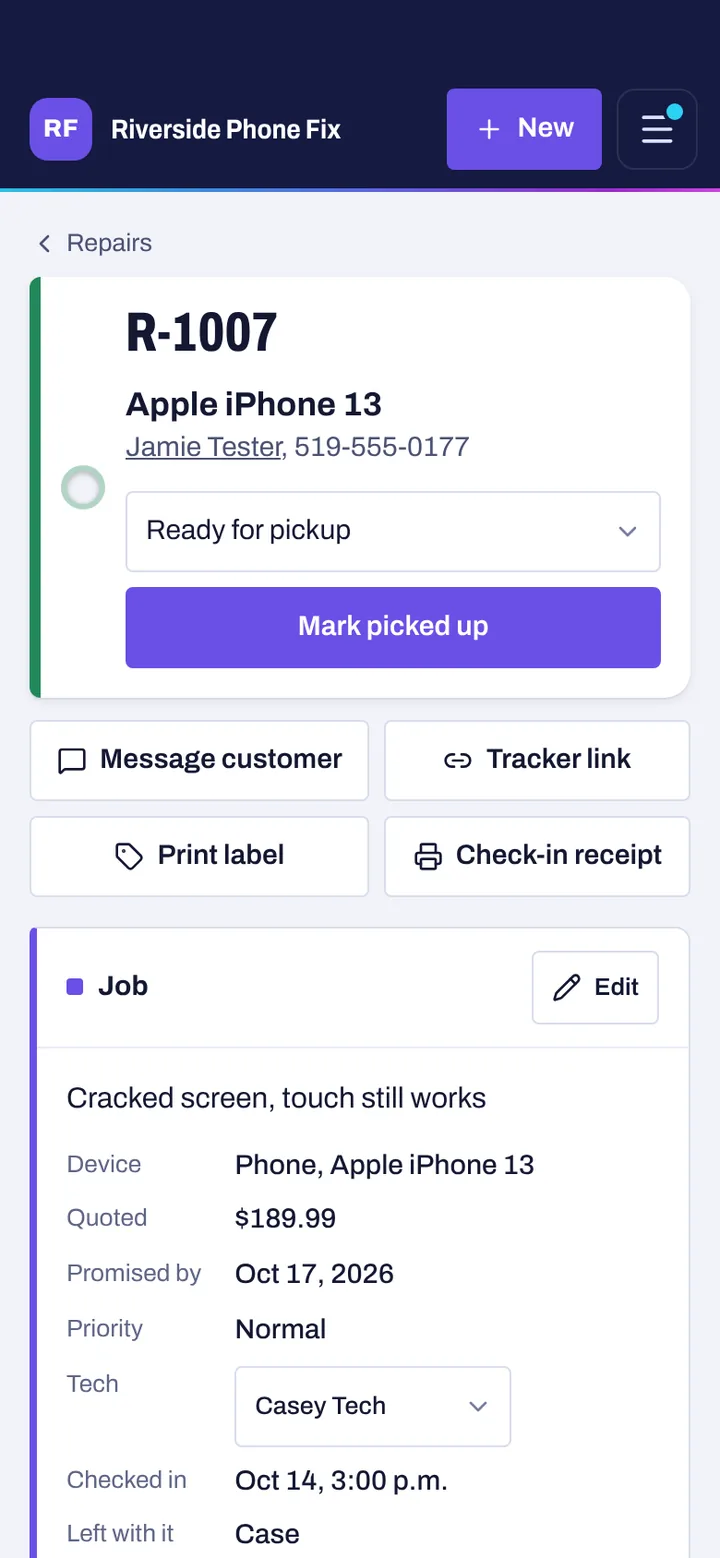
Run the counter from your phone.
Same app, same shop, sized for one hand. No app store and no extra cost.
- Check in at the counter. Take photos of the damage with your camera.
- Hand it over to sign. The customer signs your terms with a finger.
- Add it to your home screen. It opens like an app and works on iPhone and Android.
Start free. Pay when you're busy.
Prices in Canadian dollars with no tax added, and the same price in every country. No contracts: cancel any time and your records stay.
Founding shops
First month free, no card. Then about US$18 a month.
- Everything in Pro
- For the first 10 shops
- A say in what gets built next
See everything in Founding shops
Everything in Pro means:
- Unlimited repairs and staff logins
- Texting from your own shop number (500 a month)
- MobileSentrix orders imported from your email
- Website quote requests and live repair tracking
- Reports, plus API keys and webhooks
Pro
About US$28. Or $390 a year, two months free.
- Unlimited repairs and staff logins
- Texting from your own shop number (500 a month)
- Customers text back, and missed calls get a text
- MobileSentrix orders imported from your email
- Website quote requests and live repair tracking
- Reports, plus API keys and webhooks
See everything in Pro
- MobileSentrix orders imported from your email
- Website quote requests and live repair tracking
- Reports, plus API keys and webhooks
Pro Plus
Or $790 a year. For busy shops that text a lot.
- Everything in Pro
- 3,000 texts a month
- A second texting number
- Bulk texts to your customers
- Your own wording for every text
- Priority support: answered first
See everything in Pro Plus
- Bulk texts to your customers
- Your own wording for every text
- Priority support: answered first
Free
For a one-person shop getting started. No card needed.
- One login, 30 repairs a month
- Customers, stock and parts orders
- Estimates, invoices, labels and receipts
- Card payments through your own Stripe account
- Daily backups
See everything in Free
- Card payments through your own Stripe account
- Daily backups
Every new shop starts with a free month of Pro. Pick a plan any time, or do nothing and you move to Free when it ends.
Outside Canada (US, UK, Ireland, Australia, New Zealand): texts go through your own Twilio number with no monthly limit from us, so the 500 and 3,000 text allowances and the second number are Canada only. Pro Plus still adds bulk texts, your own wording and priority support.
Good to know
Do I need special hardware?
No. Any computer with a web browser works, and so does your phone or tablet. Any label printer that works with Windows prints the labels, and any USB barcode scanner reads them.
What happens after the free month?
You pick: keep Pro (CA$25 a month for founding shops, CA$39 otherwise), move up to Pro Plus, or do nothing and your shop moves to Free. Nothing is deleted; texting, email order import, website forms, reports and extra logins just pause until you're back on Pro. The app and an email remind you a week before.
Do I need a credit card to start?
No. Sign up with just an email. You only add a card when you pick a plan, and nothing is charged until your free month ends.
How do founding spots work?
The first 10 shops get Pro for CA$25 a month (about US$18) instead of CA$39. Your spot is held through your free month and for as long as you pay; if the free month ends without a plan, it goes to the next shop. The count on this page is live.
Is my data backed up, and where is it hosted?
The app and its database run on Render, in their Ohio (US) region, the closest one to Ontario. Each shop gets a backup every day that you can download from Settings → Backups, and you can export your repairs, customers and stock to a spreadsheet any time. Each shop's records are walled off from every other shop, and device passcodes are encrypted and deleted at pickup.
Can I take card payments?
Yes, on every plan. Connect your own Stripe account (Settings → Card payments) and send the customer a pay link by text or email, or show a QR code at the counter or in Quick sale that they scan to pay on their phone. The money goes straight to your Stripe account. There's no card reader yet.
Does it work offline?
It needs the internet, but the counter keeps going if it drops: check-ins and quick sales wait on the screen and are sent as soon as you're back, with the time they really happened.
Does it work on an iPad or Android tablet?
Yes. It runs in the browser on iPad, Android, Windows and Mac. Use "Add to Home Screen" in the browser menu and it opens like an app. You can check in on the tablet while someone else works the computer.
Can I buy and sell used phones?
Yes. Add phones for sale with their IMEI (checked for typos), storage, colour and condition, tick that iCloud or Google lock is off and it isn't blacklisted, and show them on your website. When you buy a phone from a customer, print a bill of sale with the seller's ID and signature. Blacklist checks aren't included in plans yet, but you can connect your own IMEI check account in Settings.
How do I get help?
Start with the user guide in the app: every screen, step by step, with pictures. Still stuck? Open Help & support and send a message, screenshots welcome. Replies come back right there, and Pro Plus shops are answered first.
Can I bring my customers over from another system?
Yes. Import customers, stock and repair history from a CSV file exported from RepairDesk, RepairShopr, Excel or Google Sheets. The columns are matched for you, and you see everything before it's saved.
How do the texts work?
In Canada, one click gives your shop its own local number: 100 texts during the free month, 500 a month on Pro, 3,000 on Pro Plus. Customers get repair updates from it and can text you back. Anywhere else (or if you'd rather), connect your own Twilio account and number, with no monthly limit from us.
Does it work outside Canada?
Yes, in the US, the UK, Ireland, Australia and New Zealand. Pick your country when you sign up and the app uses your currency, your tax name and rate, and your local phone number format. Plans cost the same everywhere, charged in Canadian dollars. The app is in English for now.
Can my staff use it?
Yes, on Pro (and during the free month). Techs get their own logins and their own queue of repairs, and you choose whether they can see money, give refunds, delete or change prices. Settings → Activity shows who did what. The Free plan has one login.
What if I cancel?
You keep Pro until the end of what you've paid for, then your shop moves to Free. Nothing is deleted. If you come back later, a new subscription is at the regular price.
Try it on your next repair.
Sign up in a minute, no card. Load the sample data to look around, and check in your first real job when you're ready.